Task manager for your life (yes, work + personal together)
Work projects and life stuff in one app, organized in #spaces. Give each task a duration and see how full your day is (including meetings!).
Free. Mac with Apple silicon and macOS 13 or later.
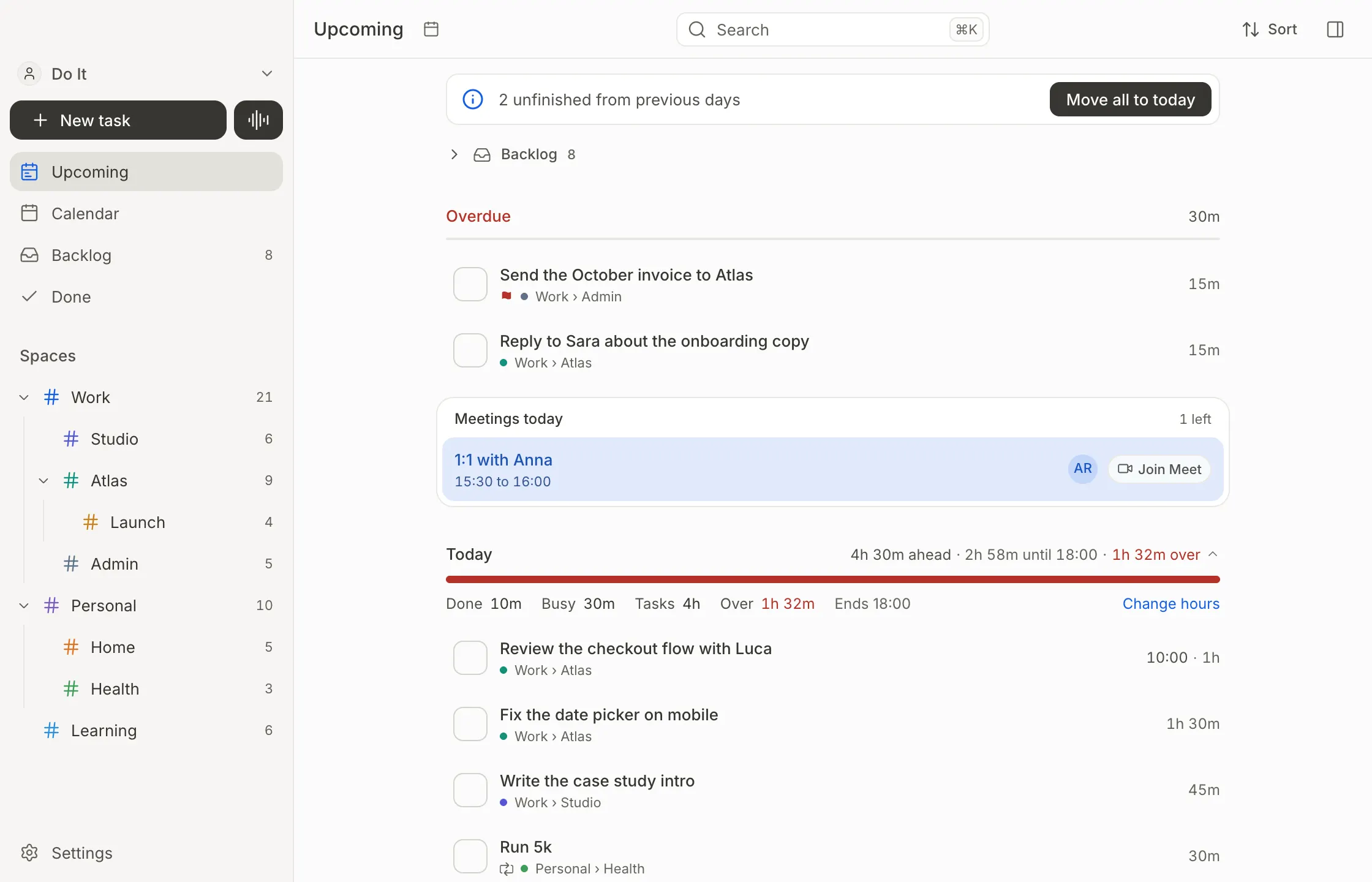
See how full each day is before you fill it.
Do It reads your meetings from Google Calendar and Outlook.
Connect one or more Google or Microsoft accounts (Outlook.com and Microsoft 365). Your meetings show in your day and count against the time you have.
Sees only the calendars you pick
Do It sees your list of calendars and reads events only from the ones you turn on, with who is invited and the link to join.
Writes only to its own calendar
A task with a time goes on a calendar named Do It. Your other calendars are never changed.
Your events stay on your device
They are kept only on the Mac or iPhone you connected. Our server never receives them.
Disconnect any time
From the app's calendar settings. Do It asks whether to remove its calendar from your account too.
Do It's use and transfer of information received from Google APIs follows the Google API Services User Data Policy, including the Limited Use requirements. Google and Microsoft data is never used for advertising, never sold and never used to train a model.
Add a task by typing, speaking or asking.
Quick add reads the day, the time, the length and the priority from what you type, like “call mum tomorrow at 15 30m p1”.
Record a voice memo and Do It turns it into separate tasks. You check the list before anything is added.
On iPhone, share a link or a piece of text to Do It and it becomes a task.
Connect Claude, ChatGPT or the doit command line. They read your tasks and, if you allow it, add, change or complete them.
Your tasks are encrypted before they leave your device.
Every device keeps a full copy of your list and works offline. Sync is end-to-end encrypted, so our server stores your tasks but cannot read them.
End-to-end encrypted sync
Your devices hold the key. Our server stores your tasks and cannot read them.
Sign in without a password
Sign in with Apple, Google, a passkey or a code sent to your email.
No ads and no tracking
No analytics, no trackers and nothing sold. The app asks the internet for updates and your sync, and that is all.
What people ask before they download.
Is Do It free?
Yes. Do It is free on Mac and iPhone, with no paid tier and no ads.
Do I need an account?
Yes. One account keeps the same list on your Mac and your iPhone. You sign in with Apple, Google, a passkey or a code sent to your email.
Does Do It work with Google Calendar and Outlook?
Yes. Connect one or more Google or Microsoft accounts (Outlook.com and Microsoft 365). Your meetings show in your day and count against the time you have.
Can I give a task a time estimate?
Yes. Every task can have a length. Type it with the task, like “write the report 45m”, and Do It adds up your tasks and meetings to show how full each day is.
Can I keep work and personal tasks apart?
Yes. Tasks live in spaces, like Work and Personal, and a space can hold other spaces. Upcoming shows all of them together, day by day.
Does Do It work offline?
Yes. Every device keeps a full copy of your list and works offline. Changes sync when you are back online, end-to-end encrypted.
Can I plan a task over several days?
Yes. A task can run from one day to the next as one task, with one set of notes and steps.
Can I use Do It with Claude or ChatGPT?
Yes. Connect Claude, ChatGPT or the doit command line. They can read your tasks and, if you allow it, add, change or complete them.
Which Macs does Do It run on?
Macs with Apple silicon and macOS 13 or later.
Get Do It free on your Mac and iPhone.
One account keeps the same list on both. Free, with no paid tier and no ads.